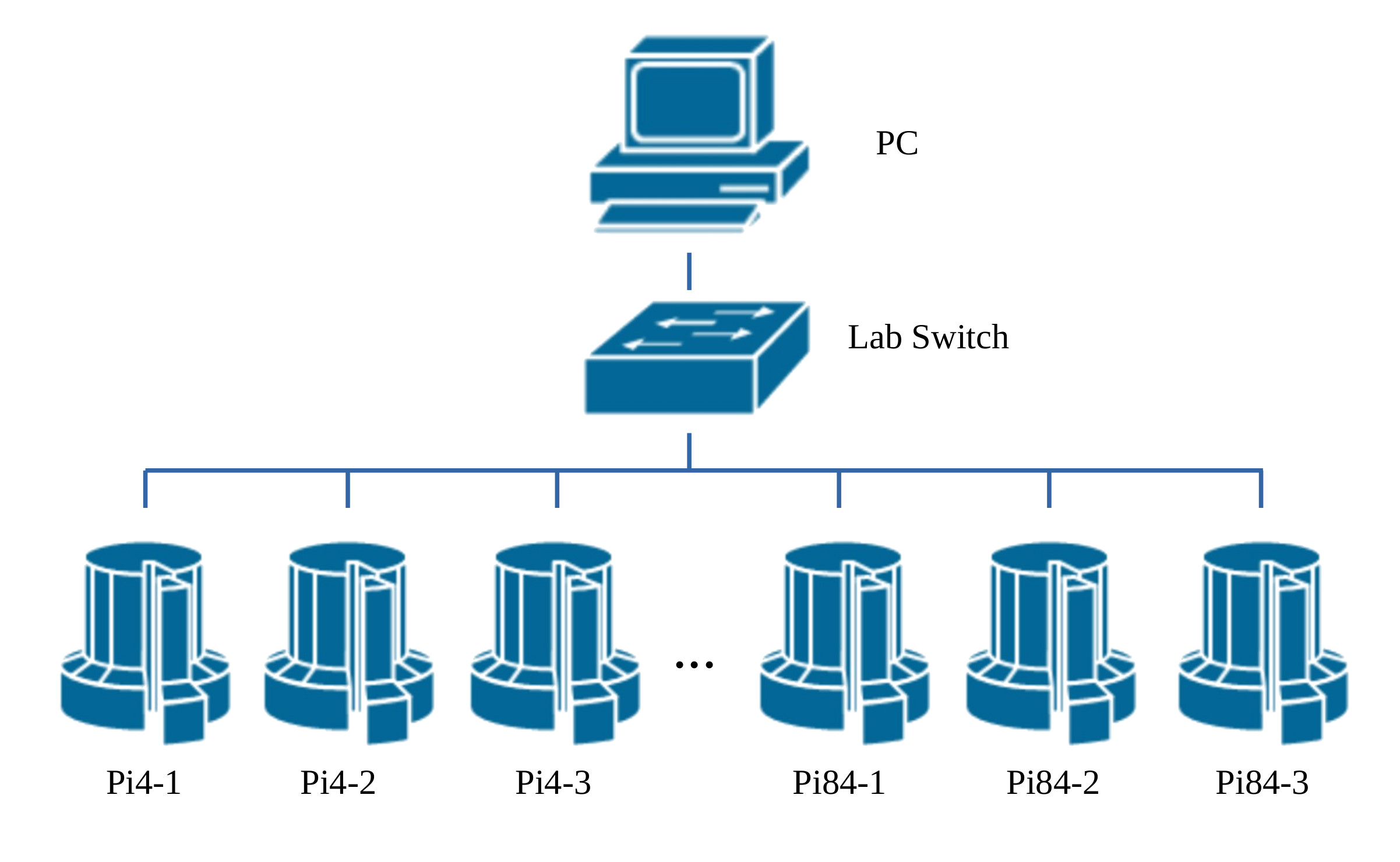
Figure 1 : Pi "cluster"
We have 80 desks in the lab, each having a Raspberry Pi base node (Link), these contain 3 Raspberry Pis, thus forming a cluster of 240 processing nodes. Each node (Raspberry Pi) has 4 processing cores, so in total we have 960 processing elements, soooo Pi super computer :). In the past when attempting parallel programming i've used the MPI library (Link). This library provides the functions needed to distribute, control and execute code across yours hosts e.g. your classic Beowulf cluster (Link). MPI is a definite contender as a software architecture, however, as this cluster is a teaching platform i decided to go back to basics i.e. build the required software to distribute, control and execute code from first principles.
Temperature Display.
Finding Prime Numbers.
Game of Life.
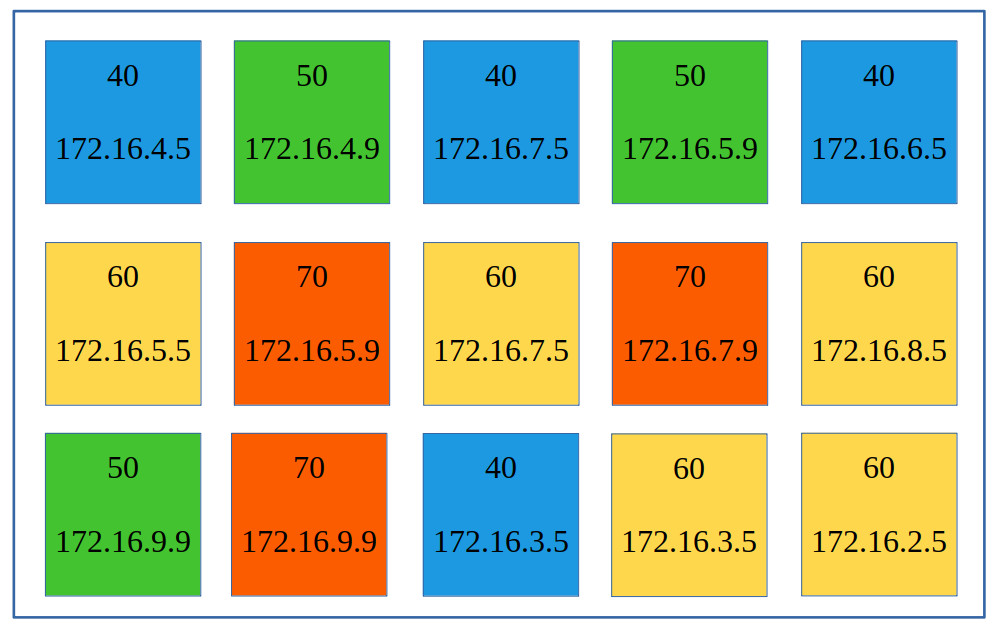
Figure 2 : example GUI of Pi temperature plot
Not really a parallel processing applications, but to start off i decided to write a simple program to monitor the temperatures of the Pis in the cluster i.e. a head node that receives IP + temperature values from each worker node and displays this data on a screen. This data will be colour coded, as shown in figure 2 e.g. blue=40, green=50, yellow=60, orange=70 and red=80 degrees. The worker node code is shown below, or you can download it using this link (Link):
###############
# WORKER NODE #
###############

import socket
import json
import time
import os
import psutil
import sys

# Head nodes IP address

SERVER_IP = "192.168.1.100"
PORT = 5050

# vcgencmd to get CPU temp

def get_temp():
  try:
    temp_str = os.popen("vcgencmd measure_temp").readline()
    temp = float(temp_str.replace("temp=", "").replace("'C\n", ""))
  except:
    temp = 0.0  # default
  return temp

# check to see if code already running, if so exit

def is_another_instance_running():

  # PID of this program & full path + filename

  current_pid = os.getpid()
  current_script = os.path.abspath(__file__)

  # get PID and "full path + filename" of running processes and check if
  # "full path + filename" already exists

  for proc in psutil.process_iter(['pid', 'cmdline']):
  try:
    if proc.info['pid'] == current_pid:
      continue
    cmdline = proc.info['cmdline']
    if cmdline and current_script in cmdline:
      return True
  except (psutil.NoSuchProcess, psutil.AccessDenied):
    continue
  return False

# main loop, get IP address, TX

def send_temp():

  # Get an IP address

  addrs = psutil.net_if_addrs()
  ip = "???"
  if "eth0" in addrs:
    for addr in addrs["eth0"]:
      if addr.family == socket.AF_INET:
        ip = addr.address

  # create dictionary, convert into byte stream, calc length, TX

  while True:
    temp = get_temp()
    payload = {
      "ip": ip,
      "temp": temp
    }

    # convert data into bytes.
    # dictionary converted into JSON string, then into bytes
    # length of data converted into fixed length, four byte value

    data = json.dumps(payload).encode('utf-8')
    length = len(data).to_bytes(4, 'big')

    # try to TX

    try:
      with socket.socket(socket.AF_INET, socket.SOCK_STREAM) as s:
        s.connect((SERVER_IP, PORT))
        s.sendall(length + data)
        print(f"Sent: {payload}")
    except Exception as e:
      print(f"Failed to send data: {e}")

    # send IP + TEMP every 5 seconds
    time.sleep(5)

if __name__ == "__main__":
  if is_another_instance_running():
    print("Another instance of this script is already running. Exiting.")
    sys.exit(0)
  send_temp()
This code needs to be copied to each worker node and executed. We could do this manually e.g. ftp, but that's not very practical, so i wrote a Bash script to do this. To specify which host should receive and run this code each worker node's IP address is listed in the file: pi_list.txt, its format is shown below, you can download it using this link (Link):
192.168.4.1
192.168.4.2
192.168.4.3
192.168.5.1
192.168.5.2
192.168.5.3
...
192.168.66.1
192.168.66.2
192.168.66.3
192.168.67.1
192.168.67.2
192.168.67.3
To generate this list for a few host i simply cut and pasted the required values e.g. for testing i only distributed the worker code to 10 Pis. For larger clusters you need to automate this, so i wrote the script below, you can download it using this link (Link):
#!/bin/bash

start_subnet=4
end_subnet=67

echo -n > pi_list.txt
for subnet in $(seq $start_subnet $end_subnet)
do
  for host in {1..3}
  do
    echo "192.168.$subnet.$host" >> pi_list.txt
  done
done
To distribute the worker code across the cluster the script below uses scp and ssh. This is a simple implementation so it has its failings :). The script reads the file: pi_list.txt, accesses each node's IP address, transfers the file: worker-1.py, to this address using scp and executes it using ssh. You can download it using this link (Link).
#!/bin/bash

WORKER_SCRIPT="worker-1.py"
REMOTE_PATH="/home/pi/$WORKER_SCRIPT"
PI_LIST="pi_list.txt"
SSH_USER="pi"
PASSWORD="12345"
MAX_RETRIES=3

count=0
echo -n > failed.log
echo $count > count.log

cat "$PI_LIST" | while read ip
do
  if test -z "$ip"
  then
    continue
  fi

  echo "Deploying to $ip..."

  attempt=1
  success=0

  while test $attempt -le $MAX_RETRIES
  do
    echo "Attempt $attempt to copy script to $ip..."

    expect <<EOF
      set timeout 10
      spawn scp $WORKER_SCRIPT $SSH_USER@$ip:$REMOTE_PATH
      expect {
        "continue connecting (yes/no)?" {
          send "yes\r"
          exp_continue
        }
        "password:" {
          send "$PASSWORD\r"
          expect {
            "100%" { exit 0 }
            eof { exit 1 }
          }
        }
        timeout { exit 1 }
        eof { exit 1 }
      }
EOF

    if test $? -eq 0
    then
      echo "Transfer successful to $ip."
      success=1
      break
    else
      echo "Transfer failed to $ip. Retrying..."
      attempt=$((attempt + 1))
    fi
  done

  if test $success -eq 1
  then
    echo "Starting worker script on $ip..."
    expect <<EOF
      spawn ssh $SSH_USER@$ip "nohup python3 $REMOTE_PATH > /home/pi/pi_worker.log 2>&1 &"
      expect "password:"
      send "$PASSWORD\r"
      expect eof
EOF
    count=$((count + 1))
    echo $count > count.log

  else
    echo "Failed to deploy to $ip after $MAX_RETRIES attempts."
  fi
done

count=`cat ./count.log`
echo "Deployment complete: $count workers"
You can definitely make the case that placing passwords in a script is bad practice, but for the purposes of teaching i'm going to let that one slide. Just in case there are any issue with the transfer the script tries 3 times on scp. Note, when testing in the lab i had problems with the lab's switch dropping connections. I was told later it was something to do with the VLAN allocation. This meant that connections to each Pi would drop out from time to time. This was not toooo much of an issues as you can rerun this script if there is a disconnect. The worker code will prevent multiple copies running on the same node at the same time. When using the scp and ssh commands you need to send a password, i could have gone password-less using SSH keys, but decided against that as this is an adhoc cluster, soooo within the Bash script you have two Expect scripts that describe the expected interactions between client and server. Note, these do assume no fault conditions, if things do go wrong hosts can easily get out of sync and fail. However, this is not a big issue as you can keep running the distribution script again and again until all worker nodes are up and running.
Extra note : tried this on a newer laptop this script had issues with host key checking, not sure why, did add an extra test to the except script, but, as this is a closed network could get around this using : ssh -o StrictHostKeyChecking=no user@new-server-ip. Seems to work at the moment :)
To make things look nice the head node uses TKinter, to produce the GUI shown in figure 2. The basic operation is the head node waits for incoming connections from the worker nodes. It then creates a handle_client thread that receives this data, updates a shared dictionary containing IP + temperature values, then finally closes the connection. This code is shown below, or you can download it using this link (Link):
#############
# HEAD NODE #
#############

import socket
import json
import threading
import tkinter as tk

# Server port and shared data
PORT = 5050
temps = {}
lock = threading.Lock()

# Temperature range
MIN = 40   # Coldest expected temperature
MAX = 80   # Hottest expected temperature

# Grid configuration (240 Pi)
ROWS = 12
COLS = 20
SQUARE_SIZE = 70
PADDING = 10

# GUI setup
root = tk.Tk()
root.title("Live Pi Cluster Temperatures")
canvas_width = COLS * (SQUARE_SIZE + PADDING)
canvas_height = ROWS * (SQUARE_SIZE + PADDING)
canvas = tk.Canvas(root, width=canvas_width, height=canvas_height, bg="white")
canvas.pack()

def get_color(temp):
  # Clamp and normalize temperature

  temp = max(MIN, min(MAX, temp))
  t = (temp - MIN) / (MAX - MIN)

  # Interpolate RGB from blue → green → yellow → orange → red

  if t < 0.25:
    r = 0
    g = int(255 * (t / 0.25))
    b = 255 - g
  elif t < 0.5:
    r = int(255 * ((t - 0.25) / 0.25))
    g = 255
    b = 0
  elif t < 0.75:
    r = 255
    g = int(255 * (1 - ((t - 0.5) / 0.25)))
    b = 0
  else:
    r = 255
    g = 0
    b = 0

  return f'#{r:02x}{g:02x}{b:02x}'

def draw_chart():
  canvas.delete("all")
  with lock:
    items = list(temps.items())

  if not items:
    canvas.create_text(canvas_width // 2, canvas_height // 2, text="Waiting for data...", font=("Arial", 16))
    return

  for idx, (ip, temp) in enumerate(items):
    row = idx // COLS
    col = idx % COLS
    if row >= ROWS:
      break  # Don't draw beyond grid

    x0 = col * (SQUARE_SIZE + PADDING) + PADDING
    y0 = row * (SQUARE_SIZE + PADDING) + PADDING
    x1 = x0 + SQUARE_SIZE
    y1 = y0 + SQUARE_SIZE

    color = get_color(temp)
    canvas.create_rectangle(x0, y0, x1, y1, fill=color, outline="black")
    canvas.create_text((x0 + x1) // 2, y0 + 15, text=ip, font=("Arial", 8))
    canvas.create_text((x0 + x1) // 2, y1 - 15, text=f"{temp:.1f}°C", font=("Arial", 10))

def update_loop():
  draw_chart()
  root.after(2000, update_loop)   # update screen every 2000ms (2sec)

# Thread to handle each connection

def handle_client(conn, addr):
  try:
    length = int.from_bytes(conn.recv(4), 'big')
    data = conn.recv(length)

    payload = json.loads(data.decode('utf-8'))
    ip = payload["ip"]
    temp = payload["temp"]
    with lock:
      temps[ip] = temp
    print(f"{ip} reports {temp:.2f}°C")
  except:
    pass
  finally:
    conn.close()

# Socket server

def server():
  s = socket.socket(socket.AF_INET, socket.SOCK_STREAM)
  s.bind(('', PORT))
  s.listen(240)
  print(f"Listening on port {PORT}...")
  while True:
    conn, addr = s.accept()
    threading.Thread(target=handle_client, args=(conn, addr), daemon=True).start()

# Start server and GUI loop

threading.Thread(target=server, daemon=True).start()
update_loop()
root.mainloop()
In operation the Pis IP and temperature are displayed in a coloured square, as shown in figure 3. These screenshots were taken approximately 10 seconds apart, if you look carefully you can see some colour / temperature changes :). Alternatively, you can see this software in action in this short video: (Link).
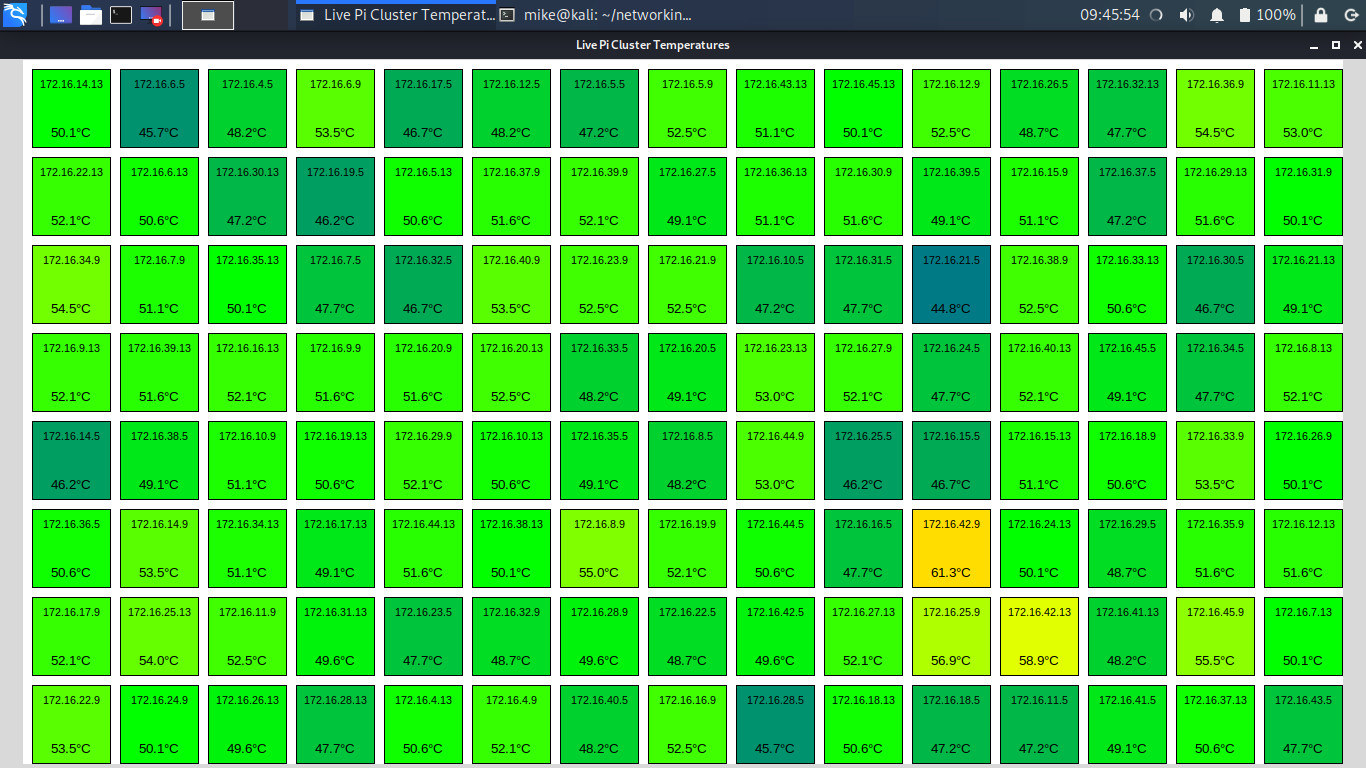
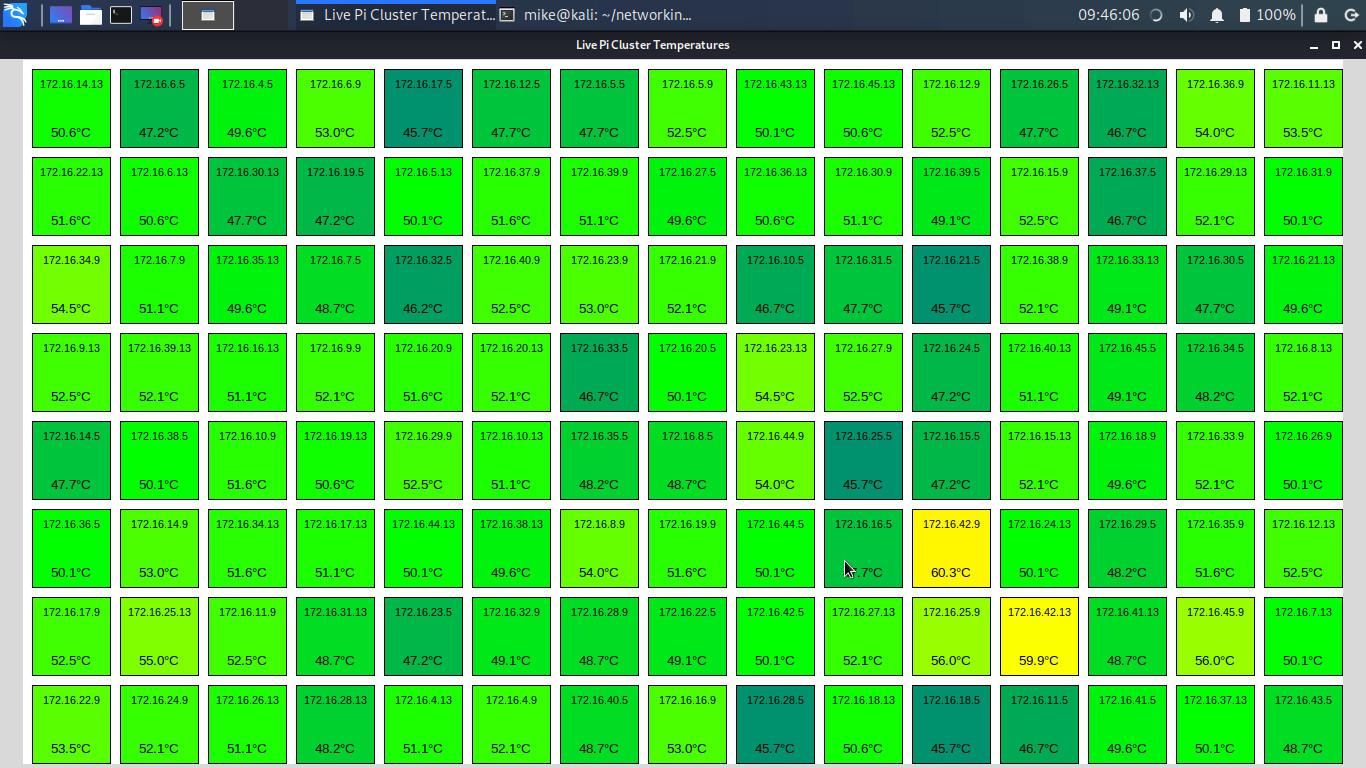
Figure 3 : Pi temperature plot
In addition to drawing nice pictures, this applications demonstrates your classic TCP phases each time a worker node transfers its data:
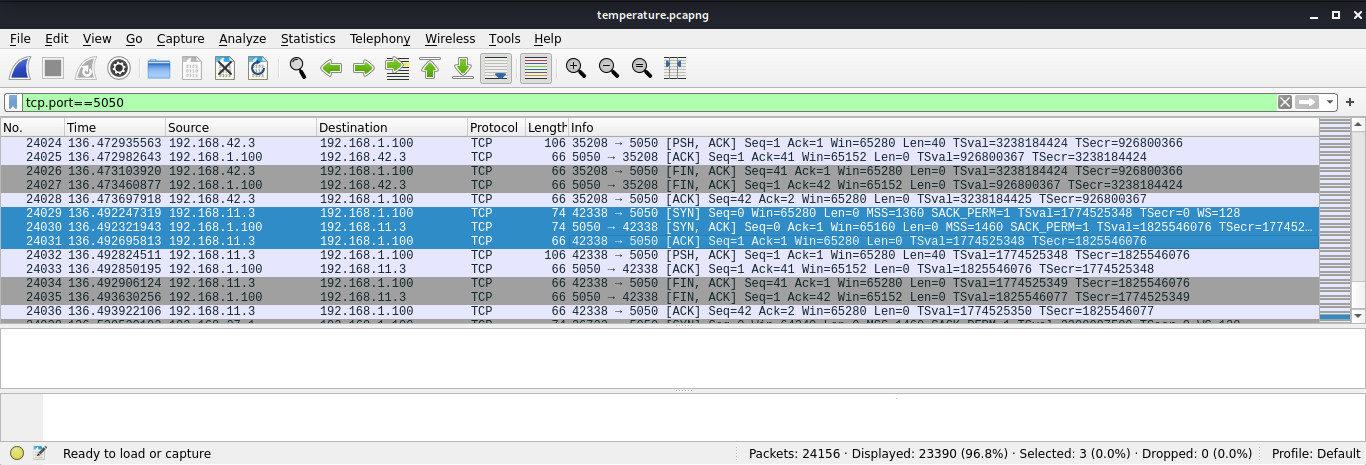
Figure 4 : SYN - SYNCACK - ACK
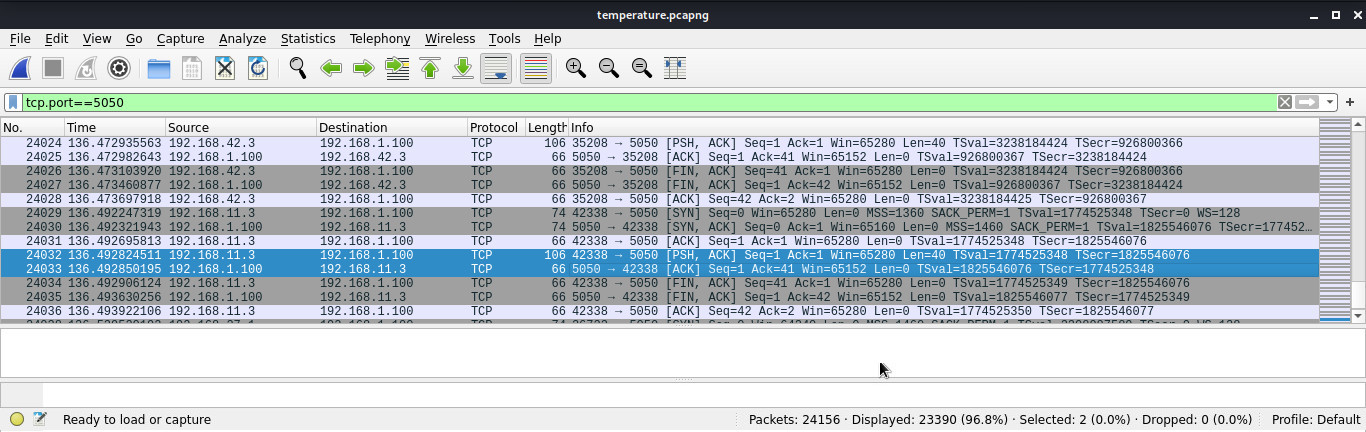
Figure 5 : PSH - ACK
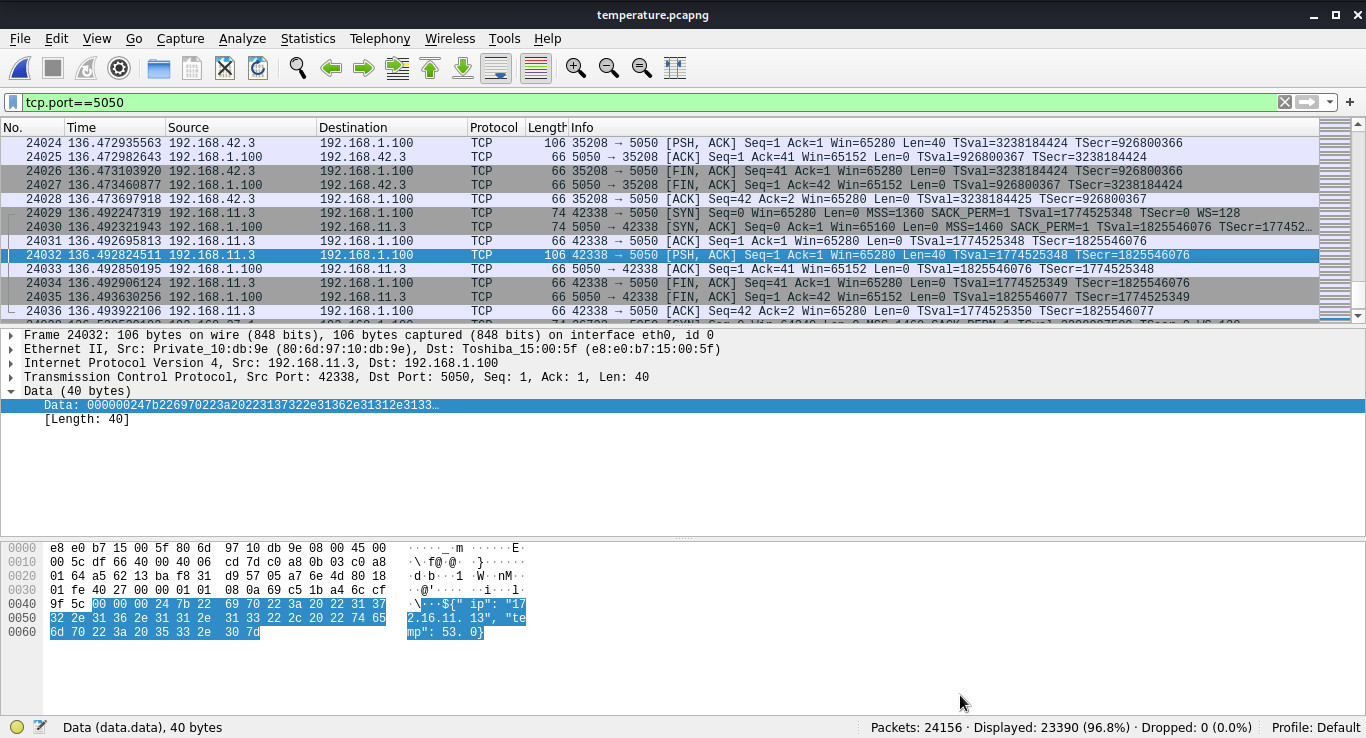
Figure 6 : DATA
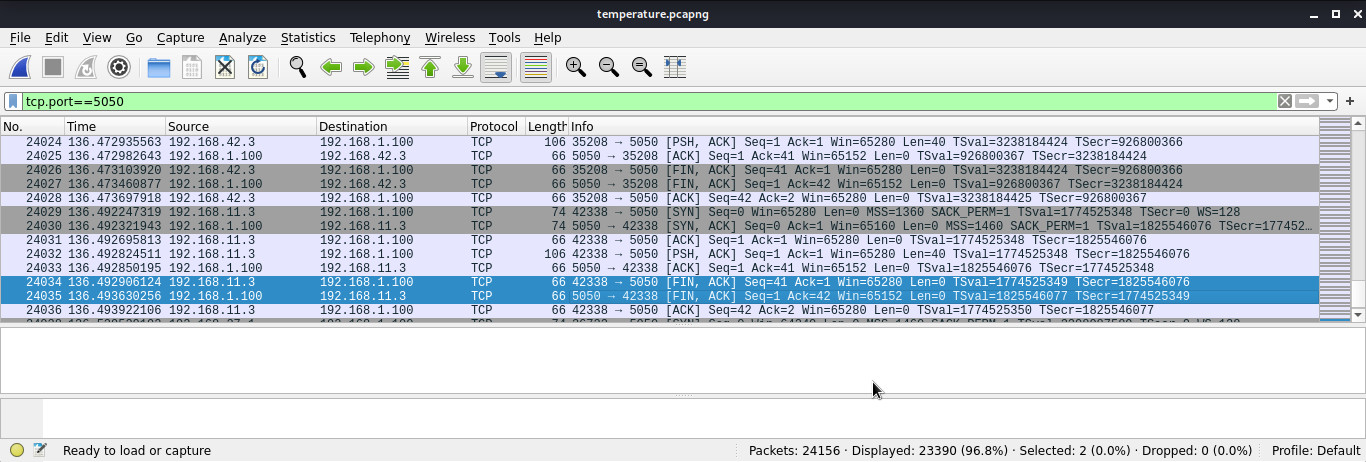
Figure 7 : FIN - FIN ACK - ACK
The previous example developed the framework needed to distribute and run code across the cluster, but it didn't do any processing. The original plan was to implement the Game of Life (Link), but distributing this across a variable number of nodes was a little more complex than i thought, soooo decided to take smaller steps and implement a system that would look for prime numbers within a specified range i.e. break a larger number ranges down into equal sized blocks and then distribute these across a network of nodes, such that each node search for primes within their assigned block in parallel, returning identified prime numbers to the head node.
The first problem to solve is how to split this number range i.e. MIN_VALUE to MAX_VALUE, across the cluster. Decided to implement this through the distribution script, i.e. script calculates the number of nodes from the pi_list.txt file, divides the number range by this and then passes start and end values to each worker node via command line parameters, as shown below, or you can download it using this link (Link):
#!/bin/bash

WORKER_SCRIPT="worker-2.py"
REMOTE_PATH="/home/pi/$WORKER_SCRIPT"
PI_LIST="pi_list.txt"
SSH_USER="pi"
PASSWORD="12345"
MAX_RETRIES=3
MAX_VAL=1000000000
MIN_VAL=1

NUM_WORKERS=`cat $PI_LIST | grep -v '^$' | wc -l`
RANGE=$(( (MAX_VAL - MIN_VAL +1) / NUM_WORKERS ))
START=$MIN_VAL

echo $NUM_WORKERS $RANGE $START

count=0
echo -n > failed.log
echo $count > count.log

cat "$PI_LIST" | while read ip
do
  if test -z "$ip"
  then
    continue
  fi

  echo "Deploying to $ip..."

  attempt=1
  success=0

  while test $attempt -le $MAX_RETRIES
  do
    echo "Attempt $attempt to copy script to $ip..."

    expect <<EOF
      set timeout 10
      spawn scp $WORKER_SCRIPT $SSH_USER@$ip:$REMOTE_PATH
      expect {
        "continue connecting (yes/no)?" {
          send "yes\r"
          exp_continue
        }
        "password:" {
          send "$PASSWORD\r"
          expect {
            "100%" { exit 0 }
            eof { exit 1 }
          }
        }
        timeout { exit 1 }
        eof { exit 1 }
      }
EOF

    if test $? -eq 0
    then
      echo "Transfer successful to $ip."
      success=1
      break
    else
      echo "Transfer failed to $ip. Retrying..."
      attempt=$((attempt + 1))
    fi
  done

  if test $success -eq 1
  then
    END=$((START + RANGE))

    if test $END -gt $MAX_VAL
    then
      END=$MAX_VAL
    fi

    echo Host: $ip start:$START end:$END
    expect <<EOF
      spawn ssh $SSH_USER@$ip "nohup python3 $REMOTE_PATH $START $END > /home/pi/pi_worker.log 2>&1 &"
      expect "password:"
      send "$PASSWORD\r"
      expect eof
EOF
    count=$((count + 1))
    echo $count > count.log
    START=$((END+1))

  else
    echo "Failed to deploy to $ip after $MAX_RETRIES attempts."
    echo "Failed to deploy to $ip after $MAX_RETRIES attempts." >> failed.log
  fi
done

count=`cat ./count.log`
echo "Deployment complete: $count workers"
The worker node code then looks for primes within the start and end range. The final worker node code is shown below, or you can download it using this link (Link):
import socket
import time
import os
import psutil
import sys

# Server IP address

SERVER_IP = "192.168.71.1"
PORT = 4040

def is_another_instance_running():
    current_pid = os.getpid()
    current_script = os.path.abspath(__file__)

    for proc in psutil.process_iter(['pid', 'cmdline']):
        try:
            if proc.info['pid'] == current_pid:
                continue
            cmdline = proc.info['cmdline']
            if cmdline and current_script in cmdline:
                return True
        except (psutil.NoSuchProcess, psutil.AccessDenied):
            continue
    return False

def how_many_instances_are_running():
    current_pid = os.getpid()
    current_script = os.path.abspath(__file__)

    count = 0
    for proc in psutil.process_iter(['pid', 'cmdline']):
        try:
            if proc.info['pid'] == current_pid:
                continue
            cmdline = proc.info['cmdline']
            if cmdline and current_script in cmdline:
                count = count + 1
        except (psutil.NoSuchProcess, psutil.AccessDenied):
            continue
    return count

def is_prime(n):
    if n < 2:
        return False
    if n == 2:
        return True
    if n % 2 == 0:
        return False
    for i in range(3, int(n**0.5) + 1, 2):
        if n % i == 0:
            return False
    return True

def send(value):
    resend = True
    data = str(value).encode()
    length = len(data).to_bytes(4, 'big')
    while resend:
        try:
            payload = length + data
            with socket.socket(socket.AF_INET, socket.SOCK_STREAM) as s:
                s.connect((SERVER_IP, PORT))
                s.sendall(payload)
                print(f"Sent: {payload}")
                resend = False
        except Exception as e:
            print(f"Failed to send data: {e}")
            time.sleep(5)

if __name__ == "__main__":
    #if is_another_instance_running():
    #    print("Another instance of this script is already running. Exiting.")
    #    sys.exit(0)

    if how_many_instances_are_running() > 3:
        print("To many instance of this script are already running. Exiting.")
        sys.exit(0)

    if len(sys.argv) != 3:
        print("Usage: python script.py  ")
        sys.exit(1)

    try:
        min_val = int(sys.argv[1])
        max_val = int(sys.argv[2])
    except ValueError:
        print("Both min and max must be integers.")
        sys.exit(1)

    if min_val > max_val:
        print("Min must be less than or equal to Max.")
        sys.exit(1)

    print(f"Prime numbers between {min_val} and {max_val}:")
    for value in range( min_val, max_val+1 ):
        if is_prime(value):
            send(value)
Another change here is that this worker code allows multiple instances of the worker code to run on the same host. The thought here is that there are four processors on each Raspberry Pi. My assumptions is its probably best to reserve one processor for the OS, sooo you could have three instances running, one on each of the "spare" processors. This is just guess work, the optimal number of instances to maximise processing performance would need to be tested e.g. does the OS need multiple processor cores to run, does each processor have the capacity to run multiple instances i.e. what are the multi-tasking bottlenecks, is it IO, shared resources etc? To load these multiple instances on to each processor i simply added the same IP three times to the pi_list.txt file. Not the most efficient solution, the worker code is transferred multiple time, but the code is small and it works :). Welll, it did lock up once, normally you see a constant flow of value from each node, but once this seemed to stall / lock up, not sure if this is due to doubling of RTO in the event that the head node stopped working. Need to check this, but in general seems fine.
The head node code receives the identified prime values from each worker node. As the number ranges do not overlap it doesn't need to check that these values are unique. These received values are displayed on the screen along with the largest prime and the number of primes identified. In addition to this the IP addresses of each node sending data is displayed. The user can start and stop this code by pressing the appropriate button. When they do the received values are written to a file. The final head node code is shown below, or you can download it using this link (Link):
import socket
import threading
import tkinter as tk
from tkinter import scrolledtext

# Server IP address

HOST = '192.168.1.100'
PORT = 4040

class ServerApp:
    def __init__(self, master):
        self.master = master
        self.master.title("Mike's Prime Number Finder")
        self.master.geometry("600x500")

        self.running = False
        self.server_socket = None
        self.max_prime = None
        self.unique_ips = set()
        self.unique_primes = set()

        # Text area for logs
        self.text_area = scrolledtext.ScrolledText(master, wrap=tk.WORD, state='disabled', height=10)
        self.text_area.pack(padx=10, pady=10, fill=tk.X)

        # Max prime display
        self.prime_label = tk.Label(master, text="Max prime: None", font=("Arial", 12, "bold"))
        self.prime_label.pack(pady=5)

        # Unique prime count display
        self.prime_count_label = tk.Label(master, text="Number of primes found: 0", font=("Arial", 12, "bold"))
        self.prime_count_label.pack(pady=5)

        # Unique IP list label
        self.ip_label = tk.Label(master, text="Worker IPs:", font=("Arial", 12, "bold"))
        self.ip_label.pack(pady=(10, 0))

        # Frame for IP listbox and scrollbar
        self.ip_frame = tk.Frame(master)
        self.ip_frame.pack(padx=10, pady=5, fill=tk.BOTH, expand=False)

        self.ip_scrollbar = tk.Scrollbar(self.ip_frame, orient=tk.VERTICAL)
        self.ip_listbox = tk.Listbox(self.ip_frame, height=6, yscrollcommand=self.ip_scrollbar.set)
        self.ip_scrollbar.config(command=self.ip_listbox.yview)

        self.ip_listbox.pack(side=tk.LEFT, fill=tk.BOTH, expand=True)
        self.ip_scrollbar.pack(side=tk.RIGHT, fill=tk.Y)

        # Buttons
        self.button_frame = tk.Frame(master)
        self.button_frame.pack(pady=10)

        self.start_button = tk.Button(self.button_frame, text="Start Server", command=self.start_server_thread)
        self.start_button.grid(row=0, column=0, padx=10)

        self.stop_button = tk.Button(self.button_frame, text="Stop Server", command=self.stop_server, state='disabled')
        self.stop_button.grid(row=0, column=1, padx=10)

        self.quit_button = tk.Button(self.button_frame, text="Quit", command=self.quit_app)
        self.quit_button.grid(row=0, column=2, padx=10)

        # Handle window close
        self.master.protocol("WM_DELETE_WINDOW", self.quit_app)

    def log_message(self, message):
        self.text_area.config(state='normal')
        self.text_area.insert(tk.END, message + '\n')
        self.text_area.config(state='disabled')
        self.text_area.see(tk.END)

    def update_max_prime(self, value):
        try:
            num = int(value)
            self.unique_primes.add(num)
            self.prime_count_label.config(text=f"Number of primes found: {len(self.unique_primes)}")
            if self.max_prime is None or num > self.max_prime:
                self.max_prime = num
                self.prime_label.config(text=f"Max Prime: {self.max_prime}")
        except ValueError:
            pass

    def update_ip_list(self, ip):
        if ip not in self.unique_ips:
            self.unique_ips.add(ip)
            self.ip_listbox.insert(tk.END, ip)

    def receive_data(self, conn, addr):
        self.update_ip_list(addr[0])
        while self.running:
            try:
                length_bytes = conn.recv(4)
                if not length_bytes:
                    break
                length = int.from_bytes(length_bytes, 'big')

                data = b''
                while len(data) < length:
                    packet = conn.recv(length - len(data))
                    if not packet:
                        break
                    data += packet

                message = data.decode()
                self.log_message(f"Received from {addr[0]}: {message}")
                self.update_max_prime(message)
            except (ConnectionResetError, OSError):
                break

    def start_server(self):
        self.running = True
        self.start_button.config(state='disabled')
        self.stop_button.config(state='normal')

        self.server_socket = socket.socket(socket.AF_INET, socket.SOCK_STREAM)
        self.server_socket.setsockopt(socket.SOL_SOCKET, socket.SO_REUSEADDR, 1)
        self.server_socket.bind((HOST, PORT))
        self.server_socket.listen()
        self.log_message(f"Server listening on {HOST}:{PORT}")

        while self.running:
            try:
                self.server_socket.settimeout(1.0)
                conn, addr = self.server_socket.accept()
                #self.log_message(f"Connected by {addr}")
                threading.Thread(target=self.receive_data, args=(conn, addr), daemon=True).start()
            except socket.timeout:
                continue
            except OSError:
                break

    def start_server_thread(self):
        threading.Thread(target=self.start_server, daemon=True).start()

    def save_primes_to_file(self):
        try:
            with open("unique_primes.txt", "w") as f:
                for prime in sorted(self.unique_primes):
                    f.write(f"{prime}\n")
            self.log_message("Found primes saved to unique_primes.txt")
        except Exception as e:
            self.log_message(f"Error saving primes: {e}")

    def stop_server(self):
        self.running = False
        self.start_button.config(state='normal')
        self.stop_button.config(state='disabled')
        if self.server_socket:
            try:
                self.server_socket.close()
            except OSError:
                pass
            self.server_socket = None
        self.log_message("Server stopped.")
        self.save_primes_to_file()

    def quit_app(self):
        self.stop_server()
        self.master.quit()

if __name__ == "__main__":
    root = tk.Tk()
    app = ServerApp(root)
    root.mainloop()
A screen shot of this code running is shown below in figure 8.
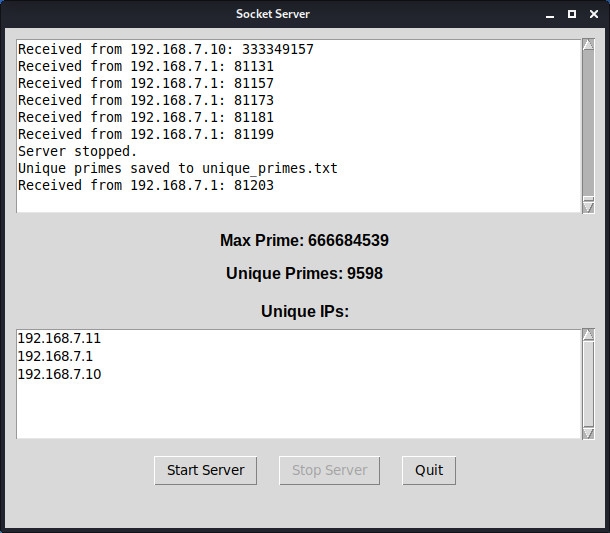
Figure 8 : prime head node GUI
I decided to make this demo into an openday demo. I had previously bought some 20mm Vtype, or 2020 aluminium extrusion, sooo i made a quick frame to create Mike's Prime Number Finder :), as shown in figure 9. This beast / mini-supercomputer has 12 Raspberry Pis, 11 are worker nodes, 1 is the head node. The worker nodes run three instances of the prime number finder worker code and the temperature code. This data i.e. primes and temperature, is transmitted to the head node and displayed on the top monitor. Connecting these processors together we have an old HP ProCurve 2524 (J4813A) switch (Link). This give me a lot more ports than i need, its only 100Mbps, but its key advantage is its weight, giving the frame a low centre of gravity :). Sooo we have:
Number of processors = 11
Number of processes running 11 x 3 = 33

Figure 9 : Mike's Prime Number Finder (MPNF)
As always there is testing and testing :). Forgot that this code will be running for a long time and that a computer does not have infinite memory :). As you may have spotted the display code will keep dumping values the set of unique_primes and logging messages, eventually we run out of memory and the OS can not create a thread to handle the incoming connections, soooo, a new and improved version of the display code was needed. This dumps log messages now to disk i.e. when we get 10,000 lines the text box is dumped to disk and cleared. The same is true for the set of unique_primes, this is dumped to a file every five minutes. The final head node code is shown below, or you can download it using this link (Link):
import socket
import threading
import tkinter as tk
from tkinter import scrolledtext

HOST = '192.168.71.1'
PORT = 4040

MAX_LINES_TRIGGER = 10000
KEEP_LINES = 20
SAVE_PERIOD = 60 * 5

class ServerApp:
    def __init__(self, master):
        self.master = master
        self.master.title("Primes Socket Server")
        self.master.geometry("600x600")

        self.running = False
        self.server_socket = None
        self.max_prime = None
        self.unique_ips = set()
        self.unique_primes = set()

        # Text area for logs
        self.text_area = scrolledtext.ScrolledText(master, wrap=tk.WORD, state='disabled', height=10)
        self.text_area.pack(padx=10, pady=10, fill=tk.X)

        # Max prime display
        self.prime_label = tk.Label(master, text="Max Prime: None", font=("Arial", 12, "bold"))
        self.prime_label.pack(pady=5)

        # Unique prime count display
        self.prime_count_label = tk.Label(master, text="Unique Primes: 0", font=("Arial", 12, "bold"))
        self.prime_count_label.pack(pady=5)

        # Unique IP list label
        self.ip_label = tk.Label(master, text="Unique IPs:", font=("Arial", 12, "bold"))
        self.ip_label.pack(pady=(10, 0))

        # Frame for IP listbox and scrollbar
        self.ip_frame = tk.Frame(master)
        self.ip_frame.pack(padx=10, pady=5, fill=tk.BOTH, expand=False)

        self.ip_scrollbar = tk.Scrollbar(self.ip_frame, orient=tk.VERTICAL)
        self.ip_listbox = tk.Listbox(self.ip_frame, height=12, yscrollcommand=self.ip_scrollbar.set)
        self.ip_scrollbar.config(command=self.ip_listbox.yview)

        self.ip_listbox.pack(side=tk.LEFT, fill=tk.BOTH, expand=True)
        self.ip_scrollbar.pack(side=tk.RIGHT, fill=tk.Y)

        # Buttons
        self.button_frame = tk.Frame(master)
        self.button_frame.pack(pady=10)

        self.start_button = tk.Button(self.button_frame, text="Start Server", command=self.start_server_thread)
        self.start_button.grid(row=0, column=0, padx=10)

        self.stop_button = tk.Button(self.button_frame, text="Stop Server", command=self.stop_server, state='disabled')
        self.stop_button.grid(row=0, column=1, padx=10)

        self.quit_button = tk.Button(self.button_frame, text="Quit", command=self.quit_app)
        self.quit_button.grid(row=0, column=2, padx=10)

        # File access
        self.file_lock = threading.Lock()

        # Handle window close
        self.master.protocol("WM_DELETE_WINDOW", self.quit_app)

    def log_to_file(self, message):
        with open("server_log.txt", "a") as log_file:
            log_file.write(message + '\n')

    def log_message(self, message):
        self.text_area.config(state='normal')
        self.text_area.insert(tk.END, message + '\n')

        lines = self.text_area.get("1.0", tk.END).splitlines()
        if len(lines) > MAX_LINES_TRIGGER:
            self.text_area.delete("1.0", tk.END)
            self.text_area.insert(tk.END, "\n".join(lines[-KEEP_LINES:]) + '\n')

        self.text_area.config(state='disabled')
        self.text_area.see(tk.END)
        self.log_to_file(message)

    def update_max_prime(self, value):
        try:
            num = int(value)
            self.unique_primes.add(num)
            self.prime_count_label.config(text=f"Unique Primes: {len(self.unique_primes)}")
            if self.max_prime is None or num > self.max_prime:
                self.max_prime = num
                self.prime_label.config(text=f"Max Prime: {self.max_prime}")
        except ValueError:
            pass

    def update_ip_list(self, ip):
        if ip not in self.unique_ips:
            self.unique_ips.add(ip)
            self.ip_listbox.insert(tk.END, ip)

    def receive_data(self, conn, addr):
        self.update_ip_list(addr[0])
        while self.running:
            try:
                length_bytes = conn.recv(4)
                if not length_bytes:
                    break
                length = int.from_bytes(length_bytes, 'big')

                data = b''
                while len(data) < length:
                    packet = conn.recv(length - len(data))
                    if not packet:
                        break
                    data += packet

                message = data.decode()
                self.log_message(f"Received from {addr[0]}: {message}")
                self.update_max_prime(message)
            except (ConnectionResetError, OSError):
                break
            finally:
                conn.close()

    def start_server_thread(self):
        threading.Thread(target=self.start_server, daemon=True).start()
        threading.Thread(target=self.periodic_save_primes, daemon=True).start()

    def start_server(self):
        self.running = True
        self.start_button.config(state='disabled')
        self.stop_button.config(state='normal')

        self.server_socket = socket.socket(socket.AF_INET, socket.SOCK_STREAM)
        self.server_socket.setsockopt(socket.SOL_SOCKET, socket.SO_REUSEADDR, 1)
        self.server_socket.bind((HOST, PORT))
        self.server_socket.listen(50)
        self.log_message(f"Server listening on {HOST}:{PORT}")

        while self.running:
            try:
                self.server_socket.settimeout(1.0)
                conn, addr = self.server_socket.accept()
                print(f"Connection from: {addr[0]}, port: {addr[1]}")
                threading.Thread(target=self.receive_data, args=(conn, addr), daemon=True).start()
            except socket.timeout:
                continue
            except OSError:
                break

    def save_primes_to_file(self):
        try:
            with self.file_lock:
                with open("unique_primes.txt", "a") as f:
                    for prime in sorted(self.unique_primes):
                        f.write(f"{prime}\n")
            self.log_message("Unique primes saved to unique_primes.txt")
        except Exception as e:
            self.log_message(f"Error saving primes: {e}")
        finally:
            self.unique_primes.clear()

    def periodic_save_primes(self):
        while self.running:
            time.sleep(SAVE_PERIOD)
            try:
                with self.file_lock:
                    with open("unique_primes.txt", "a") as f:
                        for prime in sorted(self.unique_primes):
                            f.write(f"{prime}\n")
                self.unique_primes.clear()  # Clear after saving
            except Exception as e:
                self.log_to_file(f"Error saving primes: {e}")

    def stop_server(self):
        self.running = False
        self.start_button.config(state='normal')
        self.stop_button.config(state='disabled')
        if self.server_socket:
            try:
                self.server_socket.close()
            except OSError:
                pass
            self.server_socket = None
        self.log_message("Server stopped.")
        self.save_primes_to_file()

    def quit_app(self):
        self.stop_server()
        self.master.quit()

if __name__ == "__main__":
    root = tk.Tk()
    app = ServerApp(root)
    root.mainloop()
The classic distributed Game of Life (Link). This was going to be my first parallel processing demo, however, the code for the cases and making it auto scale to the number of hosts in the cluster was a little toooo much complexity for my brain, hence the prime number demo above. However,
WORK IN PROGRESS

This work is licensed under a Creative Commons Attribution-NonCommercial-NoDerivatives 4.0 International License.
Contact email: mike@simplecpudesign.com