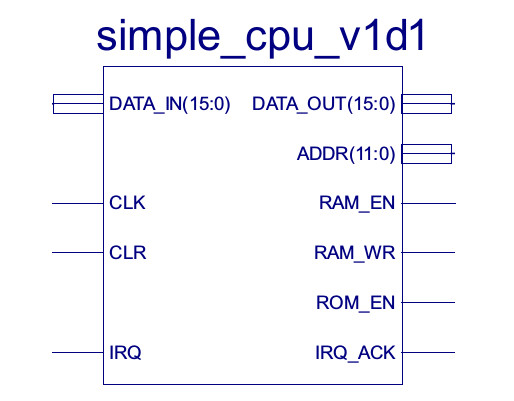
Figure 1 : SimpleCPU_v1d1
The simpleCPU version 1d is a bit of a blank canvas, a processor that can be adapted and expanded to help illustrate different architectural features. One of these is interrupts, the ability to force the processor to stop what its doing and switch its processing time over to a different "task". To help illustrate why this is architectural feature is needed and to see it in action i decided to implement this year's must have birthday and Christmas present: the simpleCPU clock :). This project will be an incremental design. The first version will implement the basics, a hardware timer to generate the interrupts and an LCD display. Next, i will add a serial port and switches to allow the time to updated i.e. allow the user to send a serial packet specifying the time using HH:MM:SS, or by pressing different switches etc, to set the time. In addition to this the serial port can transmit time data to a terminal. Finally, to allow people to see what the time is at a distance i will add a VGA display to display the time as a digital (seven segment), or analogue display.
Version 1.0 : LCD
Hardware
Software
Version 1.1 : LCD + Serial port
Version 1.2 : LCD + Serial port + Switches
Version 1.3 : LCD + Serial port + Switches + VGA
Version 1.3 : Improving accuracy, reducing drift
The ISE project and code for this version of the simpleCPU clock can be downloaded here: (Link).
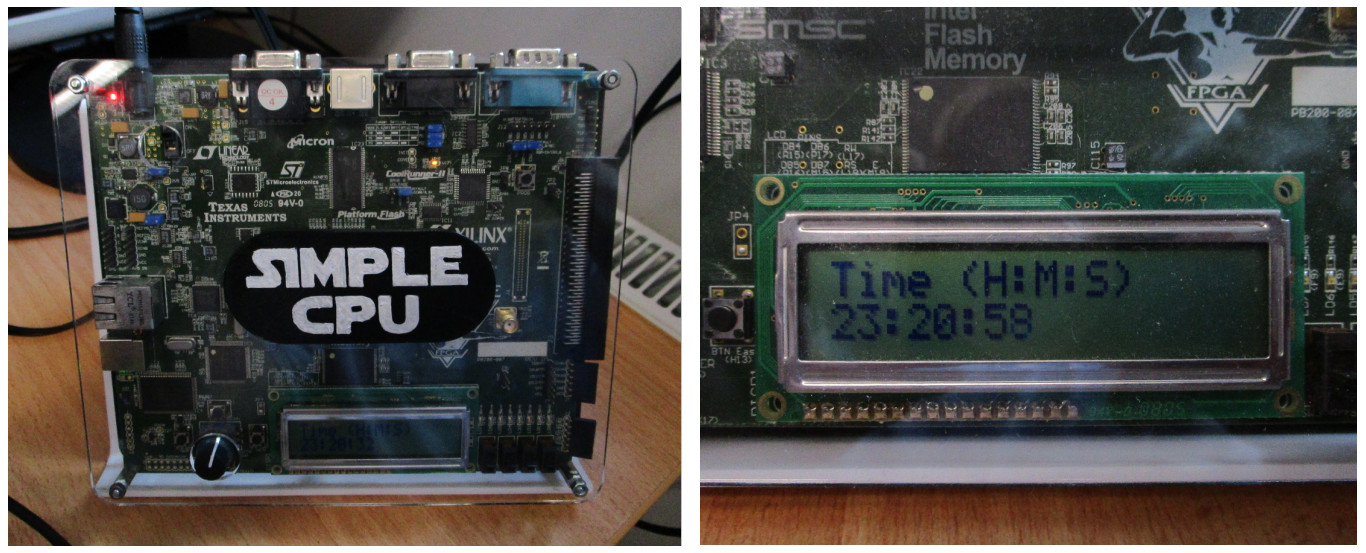
Figure 2 : version 1.0 SimpleCPU clock
To implement the first version of the clock we will need a periodic timer, a peripheral device that will generate an interrupt every second. This component is commonly referred to as a Periodic Interrupt Timer (PIT), or a Programmable Interval Timer (Link). When integrated into the clock, this component will trigger the Interrupt Service Routine (ISR) every second, allowing the processor to update the its "time" variables: seconds, minutes and hours. I could have implemented this functionality as a Real Time Clock (RTC) (Link), a peripheral device similar in functionality to the PIT, but rather than implementing the seconds, minutes, hours, days counters in software these are implemented directly in hardware within the RTC. This has the advantage that the RTC can continue to measure the passage of time when the processor is turned off i.e. typically the RTC will have a backup battery when power to the processor is turned off.
The interrupt version of the simpleCPU_v1d has a single interrupt pin, interrupting its fetch-decode-execute cycle. For more information on this processor and its interrupt handler, you can read my original mumble here: (Link). Note, there is a small bug in this design, in that you can not interrupt a jump instruction, therefore, a program that only contains a jump instruction e.g. an infinite loop at the end of a program, can not be interrupted. This is typically not an issue as we can add a dummy MOVE i.e. a no operation (NOP), but it is important to remember :). The VHDL code for the PIT is listed below:
-- =============================================================================================================
-- *
-- * File Name: timer.vhd
-- *
-- * Version: V1.0
-- *
-- * Release Date:
-- *
-- * Author(s): M.Freeman
-- *
-- * Description: Simple timer module
-- *
-- * Conditions of Use: THIS CODE IS COPYRIGHT AND IS SUPPLIED "AS IS" WITHOUT WARRANTY OF ANY KIND, INCLUDING,
-- *                    BUT NOT LIMITED TO, ANY IMPLIED WARRANTY OF MERCHANTABILITY AND FITNESS FOR A
-- *                    PARTICULAR PURPOSE.
-- *
-- * Notes:
-- *
-- =============================================================================================================

LIBRARY IEEE;
USE IEEE.STD_LOGIC_1164.ALL;
USE IEEE.STD_LOGIC_UNSIGNED.ALL;

LIBRARY UNISIM;
USE UNISIM.vcomponents.ALL;

ENTITY timer IS
PORT (
  clk      : IN STD_LOGIC;
  clr      : IN STD_LOGIC;
  addr     : IN STD_LOGIC_VECTOR(1 DOWNTO 0);
  data_in  : IN STD_LOGIC_VECTOR(15 DOWNTO 0);
  data_out : OUT STD_LOGIC_VECTOR(15 DOWNTO 0);
  we       : IN STD_LOGIC;
  ce       : IN STD_LOGIC;
  irq      : OUT STD_LOGIC );
END timer;

ARCHITECTURE timer_arch OF timer IS

  --
  -- components
  --

  COMPONENT ld_down_cnt_tc
  GENERIC (
    width : INTEGER := 32 );
  PORT (
    clk:  IN STD_LOGIC;
    clr:  IN STD_LOGIC;
    din:  IN STD_LOGIC_VECTOR(width-1 DOWNTO 0);
    dout: OUT STD_LOGIC_VECTOR(width-1 DOWNTO 0);
    ld:   IN STD_LOGIC;
    ce:   IN STD_LOGIC;
    en:   IN STD_LOGIC;
    tc:   OUT STD_LOGIC;
    z:    OUT STD_LOGIC );
  END COMPONENT;

  COMPONENT reg
  GENERIC (
    width : INTEGER := 32 );
  PORT (
    clk :  IN STD_LOGIC;
    clr :  IN STD_LOGIC;
    en :   IN STD_LOGIC;
    rst :  IN STD_LOGIC;
    din :  IN STD_LOGIC_VECTOR(width-1 DOWNTO 0);
    dout : OUT STD_LOGIC_VECTOR(width-1 DOWNTO 0));
  END COMPONENT;

  COMPONENT pulse_sync
  PORT (
    clk:     IN STD_LOGIC;
    clr:     IN STD_LOGIC;
    pulse_i: IN STD_LOGIC;
    pulse_o: OUT STD_LOGIC;
    pulse_d: OUT STD_LOGIC );
  END COMPONENT;

  --
  -- constants
  --

  CONSTANT max : STD_LOGIC_VECTOR(15 DOWNTO 0) := (OTHERS=>'1');

  --
  -- signals
  --

  SIGNAL GND : STD_LOGIC ;
  SIGNAL VCC : STD_LOGIC ;

  SIGNAL wr : STD_LOGIC ;
  SIGNAL rd : STD_LOGIC ;
  SIGNAL en : STD_LOGIC_VECTOR(2 DOWNTO 0);

  SIGNAL cnt_i  : STD_LOGIC_VECTOR(15 DOWNTO 0);
  SIGNAL cnt_o  : STD_LOGIC_VECTOR(15 DOWNTO 0);
  SIGNAL cnt_ld : STD_LOGIC;
  SIGNAL cnt_ce : STD_LOGIC;
  SIGNAL cnt_en : STD_LOGIC;
  SIGNAL cnt_tc : STD_LOGIC;
  SIGNAL cnt_z  : STD_LOGIC;

  SIGNAL command : STD_LOGIC_VECTOR(7 DOWNTO 0);
  SIGNAL status  : STD_LOGIC_VECTOR(3 DOWNTO 0);
  SIGNAL zero    : STD_LOGIC;
  SIGNAL enable  : STD_LOGIC;

  SIGNAL counter       : STD_LOGIC_VECTOR(8 DOWNTO 0);
  SIGNAL clock_div_2   : STD_LOGIC;
  SIGNAL clock_div_4   : STD_LOGIC;
  SIGNAL clock_div_8   : STD_LOGIC;
  SIGNAL clock_div_16  : STD_LOGIC;
  SIGNAL clock_div_32  : STD_LOGIC;
  SIGNAL clock_div_64  : STD_LOGIC;
  SIGNAL clock_div_128 : STD_LOGIC;
  SIGNAL clock_div_256 : STD_LOGIC;
  SIGNAL clock_div_512 : STD_LOGIC;
  SIGNAL clock_en      : STD_LOGIC;
  SIGNAL clock_pulse   : STD_LOGIC;

  TYPE state_type IS (S0, S1, S2, S3);
  SIGNAL present_state, next_state: state_type;

BEGIN

  --
  -- signal buffers
  --

  GND <= '0';
  VCC <= '1';

  wr <= we and ce;
  rd <= (not we) and ce;

  status <= cnt_en & cnt_tc & cnt_z & zero;
  zero <= cnt_z and command(0);

  --
  -- processes
  --

  -- 0xFF3
  -- 0xFF2  status register
  -- 0xFF1  command register
  -- 0xFF0    count register

  --
  -- write address decoder
  --

  input_data_decoder : PROCESS( addr, wr )
  BEGIN
    IF wr='1'
    THEN
      CASE addr IS
        WHEN "00"   => en <= "001";  -- count reg
        WHEN "01"   => en <= "010";  -- command reg
        WHEN "10"   => en <= "100";  -- status
        WHEN OTHERS => en <= "000";
      END CASE;
    ELSE
      en <= "000";
    END IF;
  END PROCESS;

  --
  -- read output mux
  --

  output_data_decoder : PROCESS( addr,
                                 cnt_o,
                                 command, status )
  BEGIN
    CASE addr IS
      WHEN "00"   => data_out <= cnt_o;
      WHEN "01"   => data_out <= "00000000" & command;
      WHEN "10"   => data_out <= "00000000" & "0000" & status;
      WHEN OTHERS => data_out <= (OTHERS=>'0');
    END CASE;
  END PROCESS;

  --
  -- clock divider network
  --

  clock_divider : PROCESS( clk, clr )
  BEGIN
    IF clr='1'
    THEN
      counter <= (OTHERS=>'0');
    ELSIF clk='1' and clk'event
    THEN
      counter <= counter + 1;
    END IF;
  END PROCESS;

  clock_div_2   <= counter(0);
  clock_div_4   <= counter(1);
  clock_div_8   <= counter(2);
  clock_div_16  <= counter(3);
  clock_div_32  <= counter(4);
  clock_div_64  <= counter(5);
  clock_div_128 <= counter(6);
  clock_div_256 <= counter(7);
  clock_div_512 <= counter(8);

  clock_pulse_mux : PROCESS( command, clock_div_2,
                             clock_div_4, clock_div_8, clock_div_16,
                             clock_div_32, clock_div_64, clock_div_128,
                             clock_div_256, clock_div_512 )
  BEGIN
    CASE command(7 DOWNTO 4) IS
      WHEN "0000" => clock_pulse <= clock_div_2;
      WHEN "0001" => clock_pulse <= clock_div_4;
      WHEN "0010" => clock_pulse <= clock_div_8;
      WHEN "0011" => clock_pulse <= clock_div_16;
      WHEN "0100" => clock_pulse <= clock_div_32;
      WHEN "0101" => clock_pulse <= clock_div_64;
      WHEN "0110" => clock_pulse <= clock_div_128;
      WHEN "0111" => clock_pulse <= clock_div_256;
      WHEN "1000" => clock_pulse <= clock_div_512;
      WHEN OTHERS => clock_pulse <= '0';
    END CASE;
  END PROCESS;

  --
  -- counter enable
  --

  clock_en_pulse : pulse_sync PORT MAP(
    clk => clk,
    clr => clr,
    pulse_i => clock_pulse,
    pulse_o => clock_en,
    pulse_d => OPEN );

  --
  -- command register
  --
  -- Bit 7 : clock select msb
  -- Bit 6 : clock select
  -- Bit 5 : clock select
  -- Bit 4 : clock select lsb
  -- Bit 3 : nu
  -- Bit 2 : nu
  -- Bit 1 : single shot (0) or auto reload (1)
  -- Bit 0 : enable count (1=true, 0=false)
  --

  command_register : PROCESS(clk, clr)
  BEGIN
    IF clr='1'
    THEN
      command <= "00000000";
    ELSIF clk='1' and clk'event
    THEN
      IF en(1)='1'
      THEN
        command <= data_in(7 downto 0);
      END IF;
    END IF;
  END PROCESS;

  --
  -- count data register
  --

  data_reg : reg
  GENERIC MAP(
    width => 16 )
  PORT MAP(
    clk  => clk,
    clr  => clr,
    en   => en(0),
    rst  => GND,
    din  => data_in,
    dout => cnt_i);

  --
  -- counter
  --

  cnt : ld_down_cnt_tc
  GENERIC MAP(
    width => 16 )
  PORT MAP(
    clk  => clk,
    clr  => clr,
    din  => cnt_i,
    dout => cnt_o,
    ld   => cnt_ld,
    ce   => cnt_ce,
    en   => clock_en,
    tc   => cnt_tc,
    z    => cnt_z );

  --
  -- state machine
  --

  sync: PROCESS(clk, clr)
  BEGIN
    IF clr='1'
    THEN
      present_state <= S0;
    ELSIF clk'event and clk='1'
    THEN
      present_state <= next_state;
    END IF;
  END PROCESS;

  comb: PROCESS(present_state, command, en, cnt_z, cnt_tc)
  BEGIN
    cnt_ld <= '0';
    cnt_ce <= '0';
    cnt_en <= '0';
    enable <= '0';

    CASE present_state IS

    -- wait for enable update
    --
    WHEN S0 =>
      cnt_ld <= '0';
      cnt_ce <= '0';
      cnt_en <= '0';

      IF en(1)='1'
      THEN
        next_state <= S1;
      ELSE
        next_state <= S0;
      END IF;

    -- test enable
    --
   WHEN S1 =>
      cnt_ld <= command(0);
      cnt_ce <= command(0);
      cnt_en <= '0';

      IF command(0)='1'
      THEN
        next_state <= S2;
      ELSE
        next_state <= S0;
      END IF;

    -- count down
    --
    WHEN S2 =>
      cnt_ld <= '0';
      cnt_ce <= '1';
      cnt_en <= '1';
      enable <= cnt_z and command(0);

      IF en(1)='1'
      THEN
         next_state <= S1;
      ELSIF cnt_z='1' and command(1)='0'
      THEN
        next_state <= S0;
      ELSIF cnt_z='1' and command(1)='1'
      THEN
        next_state <= S3;
      ELSE
        next_state <= S2;
      END IF;

    -- reload
    --
    WHEN S3 =>
      cnt_ld <= '1';
      cnt_ce <= '1';
      cnt_en <= '0';

      next_state <= S2;

    --default condition
    --
    WHEN OTHERS =>
      cnt_ld <= '0';
      cnt_ce <= '0';
      cnt_en <= '0';

      next_state <= S0;

    END CASE;
  END PROCESS;

  --
  -- interrupt pulse
  --

  irq_en_pulse : pulse_sync PORT MAP(
    clk => clk,
    clr => clr,
    pulse_i => enable,
    pulse_o => irq,
    pulse_d => OPEN );

END timer_arch;
This VHDL code and its sub-components can be downloaded here: (Link). The timer component contains three memory mapped registers shown below: command, status and count. The command register allows the user to select a pre-scalar from 5MHz to 19KHz. In addition to this the programmer can select between one-shot, or automatic reload count modes, and to enable / disable the timer. The pre-scalar clock is used by the timer's 16 bit counter. The desired delay counter is loaded into the counter, this is then decremented at the pre-scalar clock speed, an interrupt pulse being generated when the count reaches zero.
###################
# TIMER REGISTERS #
###################

# COMMAND REGISTER
# ---------------
# B7 : clock select msb
# B6 : clock select
# B5 : clock select
# B4 : clock select lsb
# B3 : nu
# B2 : nu
# B1 : single shot (0) or auto reload (1)
# B0 : enable count (1=true, 0=false)

# CLOCK SELECT BITS
# -----------------
# 0000 : clock_div_2        5MHz            0.0000002       200 ns
# 0001 : clock_div_4        2.5MHz          0.0000004       400 ns
# 0010 : clock_div_8        1.25MHz         0.0000008       800 ns
# 0011 : clock_div_16       625KHz          0.0000016       1.6 us
# 0100 : clock_div_32       312.5KHz        0.0000032       3.2 us
# 0101 : clock_div_64       156.25KHz       0.0000064       6.4 us
# 0110 : clock_div_128      78.125KHz       0.0000128       12.8 us
# 0111 : clock_div_256      39.0625KHz      0.0000256       25.6 us
# 1000 : clock_div_512      19.53125KHz     0.0000512       51.2 us

# STATUS REGISTER
# ---------------
# B7 : nu
# B6 : nu
# B5 : nu
# B4 : nu
# B3 : counter enabled
# B2 : counter terminal count
# B1 : counter zero
# B0 : zero (counter zero & count enabled)

# COUNT REGISTER
# --------------
# 16bit loadable count down counter

# Note, clock speed is 10MHz
# 1 / 0.0000512 = 19531   error = 0.25 * 51.2 us = 12.8 us per second
# error in 24 hours = 24 * 60 * 60 * 12.8us = 1.10592 seconds per day
For a one second delay a pre-scalar of 512 is used, producing a clock of 19KHz i.e. a period of 51.2us. The counter is loaded with the value of 19531, producing a delay of approximately 1 second. However, as the combination of pre-scalar clock and counter does not produce an exact 1 second delay, each "1 second" delay will have an error of +12.8us. Resulting in a 1.10592 second error each day. A simple solution to this would be to subtract 1 second from the seconds variable used to store the current time each day. However, these calculations do not include the code needed to implement the interrupt service routine (ISR) e.g. increment the seconds, minutes and hours variables. This delay is tricky to calculate as the path through the ISR will vary depending on whether the minutes and hours variables are updated i.e. each machine level instruction taken 0.3us to execute on the simpleCPU, therefore, when the timing errors is measured in micro-seconds adjustments are more of an art than a science :). The hardware used to construct version 1 of the clock is shown in figure 3:
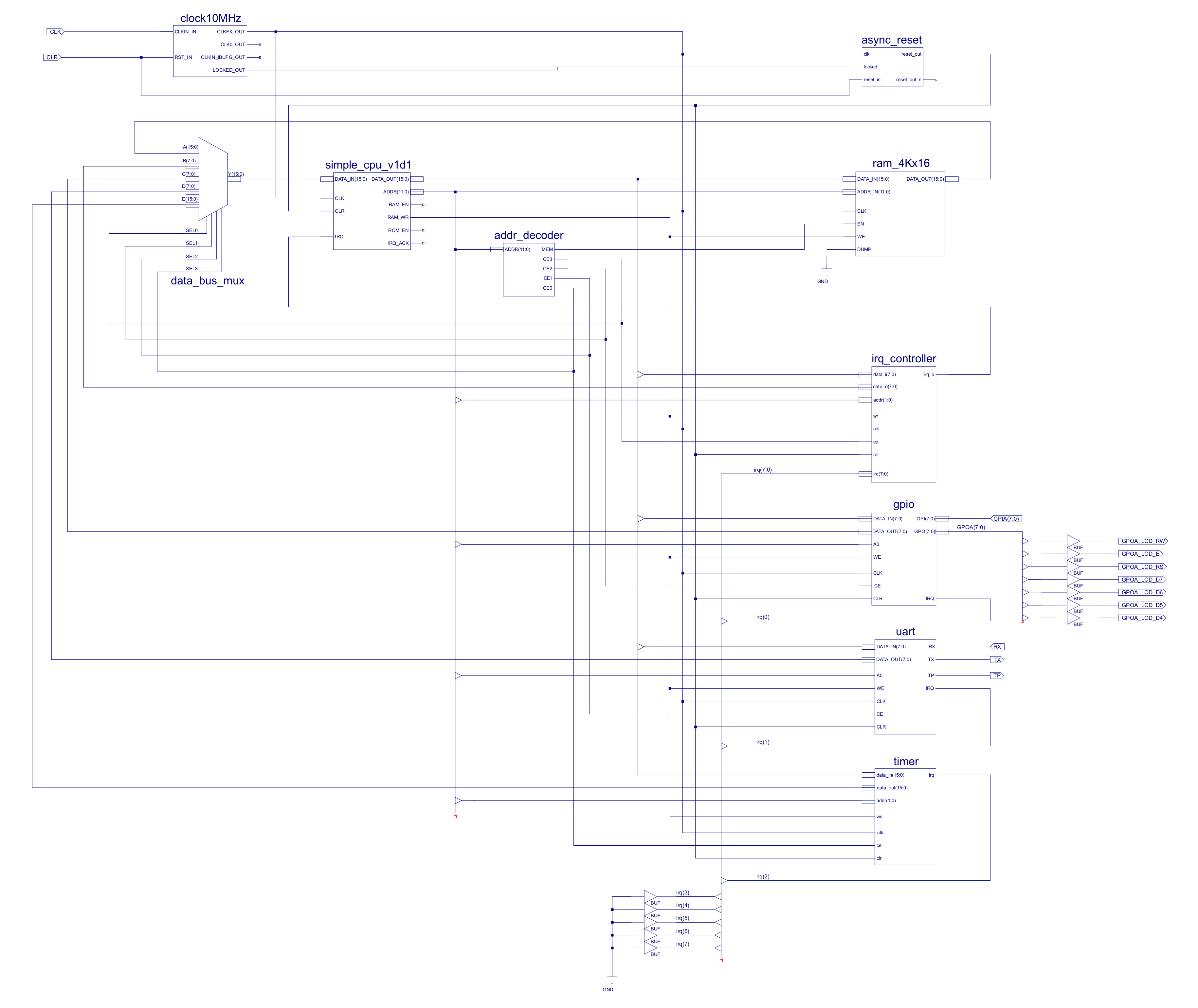
Figure 3 : version 1.0 SimpleCPU clock schematic
The control registers used by the interrupt handler, GPIO and UART are listed below. For more information on this processor and its interrupt handler: (Link). IRQ 0 has the highest priority, IRQ7 the lowest.
#################
# IRQ REGISTERS #
#################

# COMMAND REGISTER
# ----------------
# B7 : irq_7 enable (1=enable, 0=disable)
# B6 : irq_6 enable (1=enable, 0=disable)
# B5 : irq_5 enable (1=enable, 0=disable)
# B4 : irq_4 enable (1=enable, 0=disable)
# B3 : irq_3 enable (1=enable, 0=disable)
# B2 : irq_2 enable (1=enable, 0=disable)
# B1 : irq_1 enable (1=enable, 0=disable)
# B0 : irq_0 enable (1=enable, 0=disable)

# TRIGGER REGISTER
# ----------------
# when read returns one-hot representation of highest priority IRQ (0 high, 7 low)
# with read complete IRQ flag reset. In the case of multiple IRQ set the next highest
# IRQ is selected as the new trigger source.

# STATUS REGISTER
# ---------------
# when read returns a binary value of all IRQ states, this is cleared when written to.

# IRQ
# ---
# B7 : NU
# B6 : NU
# B5 : NU
# B4 : NU
# B3 : NU
# B2 : TIMER
# B1 : UART
# B0 : GPIO
The output port of the GPIO component is used to control the LCD 16 X 2 display, a 4bit bus and 3 control lines. The input port is connected to four switches and four push buttons, each with internal pull-ups i.e. when no switch/button is pressed the input value is 0xFF. Note, input port pins are inverted and ORed together to drive IRQ out.
##################
# GPIO REGISTERS #
##################

# OUTPUT PINS
# -----------
# 128  B7 : NU
# 64   B6 : RW (0)
# 32   B5 : E
# 16   B4 : RS
# 8    B3 : D7
# 4    B2 : D6
# 2    B1 : D5
# 1    B0 : D4

# INPUT PINS
# ----------
# 128  B7 : BUT3
# 64   B6 : BUT2
# 32   B5 : BUT1
# 16   B4 : BUT0
# 8    B3 : SW3
# 4    B2 : SW2
# 2    B1 : SW1
# 1    B0 : SW0
The UART used is a cut down version of that used in the Pong game (Link). Functionally, the same, but limited to 9600 bits/second so that it can use the 10MHz clock used by the processor. Note, IRQ out set by RX_VALID, did think of also adding hardware to generate an interrupt when TX is idle, however, i decided this functionality wasn't needed for this application.
##################
# UART REGISTERS #
##################

# TX : B7 - B0 data
# RX : B7 - B0 data

# STATUS REGISTER
# ---------------
# B7 : NU
# B6 : NU
# B5 : NU
# B4 : NU
# B3 : NU
# B2 : TX Idle
# B1 : RX Idle
# B0 : RX Valid
The memory map of the system shown in figure 3 is listed below i.e. the system contains four peripheral devices, mapped into the top of memory.
##############
# MEMORY MAP #
##############

# ADDR        CS       WR                        RD

# 0xFFF     3       IRQ COMMAND             IRQ COMMAND
# 0xFFE     3       NU                      IRQ TRIGGER
# 0xFFD     3       IRQ STATUS              IRQ STATUS
# 0xFFC     3       NU                      NU

# 0xFFB     2       GPIO A out              GPIO A out
# 0xFFA     2       GPIO A out              GPIO A in
# 0xFF9     2       GPIO A out              GPIO A out
# 0xFF8     2       GPIO A out              GPIO A in

# 0xFF7     1       UART TX                 UART RX
# 0xFF6     1       UART TX                 UART STATUS
# 0xFF5     1       UART TX                 UART RX
# 0xFF4     1       UART TX                 UART STATUS

# 0xFF3     0       NU                      NU
# 0xFF2     0       NU                      TIMER STATUS
# 0xFF1     0       TIMER COMMAND           TIMER COMMAND
# 0xFF0     0       TIMER COUNT             TIME COUNT

# 0xFEF     MEM     RAM                     RAM
# ...               ...                     ...
# 0x000     MEM     RAM                     RAM
The main program configures the LCD display, then enables a single IRQ source i.e. timer, with a 1 second delay. The program enters a loop, comparing the current seconds count with the previous second count. This loop is exited when the ISR increments the current seconds counter. The main program then updates the previous seconds count variable with the new value and displays the time on the LCD.
################
# MAIN PROGRAM #
################

start:
    call lcd_init                  # configure LCD and display text string
    call lcd_line_2

    move ra 0x04
    store ra IRQ_COMMAND           # enable TIMER irq, disable GPIO and UART irq

    load ra count
    store ra TIMER_COUNT           # init counter with 1 second delay count

    move ra 0x83
    store ra TIMER_COMMAND         # set clock/512, auto reload, enable timer.

wait:
    load ra previous               # is current seconds value = previous seconds value
    subm ra seconds                # if yes, wait
    jumpz wait

    load ra seconds                # update previous seconds value
    store ra previous

    call lcd_line_2                # set LCD cursor back to the start of line 2
    call displayTime               # display time i.e. HH:MM:SS

    jump wait                      # repeat

trap:
    move RA 0                      # dummy trap
    jump trap
The interrupt service routine (ISR) starts at address 0x064. Note, the ISR address can be selected by the programmer. The chosen address is used to set a constant component within the PC i.e. the programmer can update the interrupt vector in hardware, such that when an interrupt occurs the processor will jump to this address. Inside the ISR the value of RA is first saved to memory i.e. checkpointed, such that the main program's state is not corrupted. Then the timer's interrupt flag is reset by reading IRQ_TRIGGER, as there is only one interrupt source this does not need to be decoded. Next the seconds, minutes and hours variables are updated before restoring the value of RA, before control being returned back to the main program.
#######
# ISR #
#######

.addr 100

isr:
    store RA checkpoint         # checkpoint RA
    load RA IRQ_TRIGGER         # reset IRQ

    load RA seconds             # inc seconds
    add RA 1
    store RA seconds
    sub RA 60
    jumpnz isr_exit

    move RA 0                   # inc minutes
    store RA seconds
    load RA minutes
    add RA 1
    store RA minutes
    sub RA 60
    jumpnz isr_exit

    move RA 0                   # inc hours
    store RA minutes
    load RA hours
    add RA 1
    store RA hours
    sub RA 24
    jumpnz isr_exit

    move RA 0
    store RA hours

isr_exit:
    load RA seconds             # load HH:MM:SS into register RD so that it can be seen
    move RD RA                  # in the simulation when testing.
    load RA minutes
    move RD RA
    load RA hours
    move RD RA

    load RA checkpoint          # restore the value of RA
    reti
To display the time on the LCD the displayTime subroutine is used. This generates an ASCII text string lcd_time that will be displayed on the LCD. The seconds, minutes and hours variables are converted into two decimal digits using the byte2Dec_digit sbroutine. It takes approximately 70ms for the simpleCPU to update the LCD, this is mainly due to the LCD clock speed. I could increase this speed by adjusting the software time delay used in the LCD subroutines, but as this is significantly faster than 1 second interrupt rate, and the processor doesn't have anything else to do i decided not play around with something that worked i.e. KISS :)
#####################
# CLOCK SUBROUTINES #
#####################

# ----------------
# - Display time -
# ----------------

displayTime:
    movea( RC, lcd_time )       # set RC to string address

    load RA hours               # convert hour digits
    call byte2Dec_digit
    add RC 1                    # inc pointer

    move RA 0x3A                # write ":" to string
    store RA (RC)
    add RC 1                    # inc pointer

    load RA minutes             # convert minute digits
    call byte2Dec_digit
    add RC 1                    # inc pointer

    move RA 0x3A                # write ":" to string
    store RA (RC)
    add RC 1                    # inc pointer

    load RA seconds             # convert second digits
    call byte2Dec_digit
    add RC 1                    # inc pointer

    move RA 0                   # write NULL char to string to terminate
    store RA (RC)

    move ra 0                   # set lcd and config variables used by lcdTxString
    store RA lcd_config         # subroutine
    movea( RA, lcd_time )
    store RA lcd_pntr

    call lcdTxString            # display string on LCD
    ret

byte2Dec_digit:
    move RB 0

byte2Dec_digit_loop:
    sub RA 10                      # sub 10
    jumpc byte2Dec_digit_exit      # yes, exit
    add RB 1                       # inc count
    jump byte2Dec_digit_loop       # repeat

byte2Dec_digit_exit:
    add RB 0x30                    # add 0x30 to convert value to ASCII
    store RB (RC)
    move RD RB
    add RC 1

    add RA 10                      # undo last sub
    add RA 0x30                    # add 0x30 to convert value to ASCII
    move RD RA
    store RA (RC)

    ret
The code for version 1.0 of the simpleCPU clock can be downloaded here: clock_v1_0.asm. A short video of the clock in action is available here: Link, which can only be described as riveting, a lot better than watching paint dry :).
A clock that you can set the time isn't that useful, i guess its more of a timer than a clock. Therefore, as the original simpleCPU_v1.1 base system comes with a serial port, i decided to use this peripheral to set the time. The serial port connector (DCE) is shown in figure 4, running at 9600 bits/s.
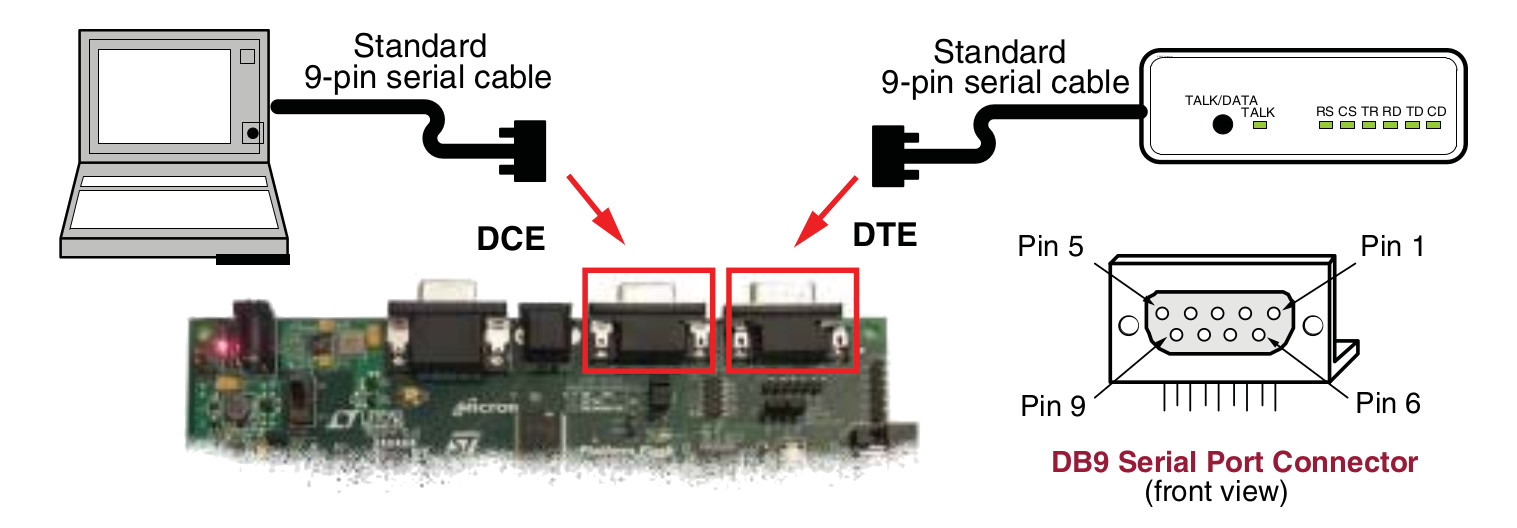
Figure 4 : serial port
The user connects to the FGPA board using its serial port connector, sending a text string using the following format: HHMMSS<CR>, some examples are shown below:
The clock uses a 24 hour format. The time variables i.e. H, M and S are updated within the clock when the user presses the Enter key i.e. sends the <CR> character, the value 0x0D. There will obviously be some delay between the user pressing the Enter key and the processor detecting this character, however, i did not see this nonrecurring delay as being significant. The serial port code can be implemented using interrupts i.e. the UART will generate an interrupt when a character is received, but for this version i decided to keep things simple and went for a polled implementation. The main subroutines used are readSerialPort and updateTime, these are non-blocking subroutines and are listed below:
# --------------------
# - Read serial port -
# --------------------
# serial packet format: HHMMSS<CR>

readSerialPort:
    load RA UART_STATUS             # test status bit
    and RA 1
    jumpz readSerialPort_exit

    load RA UART_RX                 # read char, buffer in RB
    move RB RA
    #store RA UART_TX

    movea( RC, rxBuffer )           # set pointer to rxBuf
    load RA rxBufferIndex           # calc offset
    add RC RA
    store RB (RC)                   # store data

    add RA 1
    store RA rxBufferIndex          # inc pntr

    sub RA 10
    jumpz readSerialPort_update     # have 10 chars been entered?

    sub RB 0x0D
    jumpnz readSerialPort_exit      # has cr been RX?

readSerialPort_update:
    movea( RB, rxBuffer )           # debug, dump string back to terminal
    load RA rxBufferIndex           # comment out in final design
    add RA RB
    move RC 0
    store RC (RA)
    call tx_loop

    call updateTime                 # update hours, minutes and seconds variables

    move RA 0                       # reset pntr
    store RA rxBufferIndex

readSerialPort_exit:
    ret

# --------------------------
# - Update time (HH:MM:SS) -
# --------------------------

updateTime:
    move RA 0
    store RA rxBufferIndex
    movea( RB, rxBuffer )           # string address, first char

    call updateDigits               # convert char to int

    load RA digit1                  # add digits
    addm RA digit0
    store RA hours                  # update hours

    movea( RB, rxBuffer )           # string address, third char
    load RA rxBufferIndex
    add RB RA

    call updateDigits               # convert char to int

    load RA digit1                  # add digits
    addm RA digit0
    store RA minutes                # update minutes

    movea( RB, rxBuffer )           # string address, fifth char
    load RA rxBufferIndex
    add RB RA

    call updateDigits               # convert char to int

    load RA digit1                  # add digits
    addm RA digit0
    store RA seconds                # update seconds
    ret

# Convert two CHARs into digits
# -----------------------------

updateDigits:
    load RA (RB)            # addr of char passed in RB i.e. 10s digit
    sub RA 0x30             # sub 0x30 to convert to int

    store RA digit1
    rol RA                  # x2
    rol RA                  # x4
    rol RA                  # x8
    addm RA digit1          # x9
    addm RA digit1          # x10
    store RA digit1

    add RB 1                # addr of second char
    load RA (RB)            # addr of second char in RB i.e. 1s digit
    sub RA 0x30             # sub 0x30 to convert to int
    store RA digit0

    load RA rxBufferIndex   # inc pntr
    add RA 2
    store RA rxBufferIndex
    ret
Decided not to use the serial port to send the time to the user, as i thought this would be make the process of sending the time tricky i.e. difficult to type out digits if you are receiving a text string every second. The code for version 1.1 of the simpleCPU clock can be downloaded here: clock_v1_1.asm.
The FPGA board does have a rotary encoder which would have been a nice way to adjust the time, however, the initial system only has GPIO, so for this version is going to use push buttons shown in figure 5. The EAST button will increment the minutes value, the WEST button will decrement the minutes value, overflows and underflows incrementing / decrementing the hours value. The seconds value is simply zeroed when a button is pressed.

Figure 5 : push buttons
One complexity that caused quite a bit of head scratching was the CALL/RET stack :). The simpleCPUv1d's CALL/RET stack is limited to four values i.e. normally this means four nested subroutine calls. However, i forgot that one of these slots has to be reserved for the interrupt. Therefore, when i tried to use previously tested code very strange things started to happen, as this code was developed on a version of the simpleCPUv1d that did not use interrupts i.e. it was using all four levels of nesting for subroutines, leaving no space for the interrupt. This resulted in a stack overflow, which is hard to detect when you are not looking for it :). To get round this issue i converted one of the LCD display subroutines to a macro, freeing space on the stack. Disadvantage of this is that it does increase code size a little. The main program loop has now been updated with a call to readSwitch, as shown below:
wait:
    call readSerialPort            # test serial
    call readSwitch                # test switches

    load ra currentSeconds         # has seconds been updated
    subm ra seconds
    jumpz wait

    load ra seconds                # yes, update seconds
    store ra currentSeconds

update:
    call lcd_line_2                # update display
    call displayTime

    jump wait
The readSwitch subroutine is shown below. To free space on the the stack for subroutines i.e. to stop an interrupt causing a CALL/RET stack overflow, interrupts are disabled. Contact bounce issues are handled by an initial delay loop, ensuring that any key press has been stable for 3ms. This delay could be extended if needed, however, when tested no switch press "glitches" were detected. The code then determines which switch has been pressed, increments or decrements the minutes and hours variables, seconds are zeroed. Then a 150ms software delay is performed to slow down the update rate, so that the user can select / see a specific time on the LCD display. Control then returns back to the start of this subroutine where the switch state is retested and the inc / dec funtion repeated i.e. the user can single step or hold down the button to repeatedly update the time value.
# -----------------
# - Read switches -
# -----------------
# 64  UP
# 32  DOWN

readSwitch:
    move ra 0x00                # disable irq
    store ra IRQ_COMMAND
    movea( RB, 0xFFF )          # debounce delay

readSwitch_loop:
    load RA GPIO_A_IN           # test if input is high
    and RA 0x60
    jumpz readSwitch_exit
    sub RB 1
    jumpnz readSwitch_loop

    load RA GPIO_A_IN           # up or down button pressed
    and RA 0x60
    sub RA 0x40
    jumpz readSwitch_inc

readSwitch_dec:
    move RA 0                   # set second to 0
    store RA seconds

    load RA minutes             # is minutes 0?
    and RA 0xFF
    jumpz readSwitch_dec_min

    sub RA 1                    # no dec
    store RA minutes
    jump readSwitch_update

readSwitch_dec_min:
    move RA 59                  # yes set to 59
    store RA minutes

    load RA hours               # is hours zero?
    and RA 0xFF
    jumpz readSwitch_dec_hour

    sub RA 1                    # no dec
    store RA hours
    jump readSwitch_update

readSwitch_dec_hour:
    move RA 23                  # yes set to 23
    store RA hours
    jump readSwitch_update

readSwitch_inc:
    move RA 0                   # set second to 0
    store RA seconds

    load RA minutes             # inc minutes
    add RA 1
    store RA minutes
    sub RA 60
    jumpnz readSwitch_update

    move RA 0                   # set minutes to 0
    store RA minutes

    load RA hours               # inc hours
    add RA 1
    store RA hours
    sub RA 24
    jumpnz readSwitch_update

    move RA 0                   # set hours to 0
    store RA hours

readSwitch_update:
    call lcd_line_2             # update display
    call displayTime

    move RA 40                  # set update rate
    store RA delay_count
    movea( RB, 0xFFF )

readSwitch_update_loop:
    sub RB 1
    jumpnz readSwitch_update_loop

    movea( RB, 0xFFF )
    load RA delay_count
    sub RA 1
    store RA delay_count
    jumpnz readSwitch_update_loop
    jump readSwitch

readSwitch_exit:
    move ra 0x04
    store ra IRQ_COMMAND         # enable TIMER IRQ
    ret
The code for version 1.2 of the simpleCPU clock can be downloaded here: clock_v1_2.asm.
WORK IN PROGRESS

This work is licensed under a Creative Commons Attribution-NonCommercial-NoDerivatives 4.0 International License.
Contact email: mike@simplecpudesign.com